
ErGear Heavy Duty Monitor Arm for Ultrawide Screens
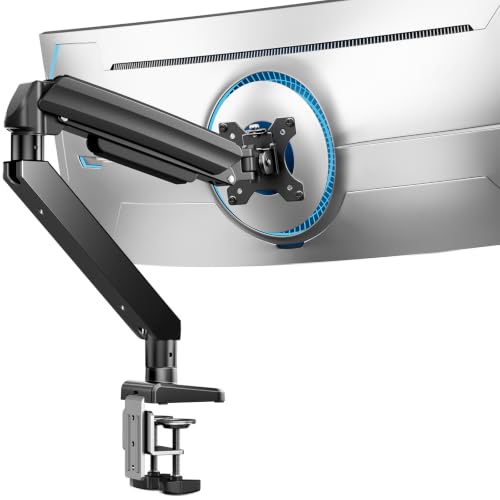
The ErGear Heavy Duty Monitor Arm is the perfect solution for remote workers and gamers who need reliable support for ultrawide monitors measuring between 33 cm and 124 cm (13″ to 49″). Compatible with VESA 75×75 mm and 100×100 mm mounting standards, this arm can hold monitors weighing up to 17 kg (37.4 lbs). Its heavy-duty design is 150% stronger than standard monitor stands, ensuring unwavering stability thanks to a dual C-clamp that optimizes load distribution.
Featuring impressive adjustability, this monitor arm allows for tilting, swiveling, and rotation, enhancing ergonomic comfort during long hours of work. By raising your monitor to eye level, it maximizes desk space, reduces clutter, and fosters a more organized home office environment, ultimately boosting productivity.
Best For: Remote workers and gamers looking for sturdy support for ultrawide monitors ranging from 33 cm to 124 cm (13″ to 49″).
Pros:
- Heavy-duty construction offers exceptional stability, minimizing wobbling during use.
- Extensive adjustability enables optimal positioning for enhanced ergonomic comfort.
- Elevating monitors maximizes desk space, contributing to a more organized workspace.
Cons:
- Installation may require additional tools, especially when using the grommet mount option.
- Compatibility is limited to VESA 75×75 mm and 100×100 mm, which may not accommodate all monitor models.
- The weight capacity of 17 kg (37.4 lbs) may not support heavier ultrawide monitors.
This monitor arm is a valuable addition to any home office setup, enhancing both functionality and aesthetics.
HUANUO Dual Monitor Stand with USB, Adjustable

HUANUO Dual Monitor Stand with USB, Adjustable
Perfect for remote workers and home office enthusiasts, the HUANUO Dual Monitor Stand significantly boosts workspace efficiency with its adjustable design. It supports monitors ranging from 13″ to 40″ (33 to 102 cm) and can hold up to 26.4 lbs (12 kg) per arm. Crafted from robust aluminum, this stand ensures durability while featuring a larger base that incorporates dual C-clamps for added stability. Its ergonomic design allows for height adjustments up to 21.1″ (53.5 cm) and arm extensions reaching 25.59″ (65 cm), offering swivel, tilt, and rotation capabilities to optimize your viewing experience. With integrated USB ports for easy device charging, the stand also includes a cable management system to keep your workspace tidy. This stand is an excellent choice for enhancing both comfort and productivity in your home office setup.
Best For: Remote workers and home office professionals seeking an adjustable dual monitor arrangement to improve productivity and ergonomic comfort.
Pros:
- Sturdy construction with solid aluminum arms ensures long-lasting stability for your monitors.
- Versatile adjustability allows for optimal monitor positioning, accommodating various desk sizes and user preferences.
- Integrated USB ports provide convenient charging solutions for devices, helping reduce workspace clutter.
Cons:
- Installation may require tools and some technical know-how, which could be a challenge for less experienced users.
- The weight limit of 26.4 lbs (12 kg) per arm may not accommodate heavier monitors.
- The price point might be higher compared to basic monitor stands lacking advanced features.
This stand is a great addition to any home office, enhancing your setup for a more productive workday.
HUANUO FlowLift Pro Monitor Arm for 13–32″ Screens

Upgrade your home office setup with the HUANUO FlowLift Pro Monitor Arm, designed for versatility and ergonomic support. This monitor arm accommodates screens from 13 to 32 inches (33 to 81 cm) and supports flat screens weighing between 4.4 to 19.8 lbs (2 to 9 kg) and curved screens up to 15.4 lbs (7 kg), ensuring broad compatibility for your workspace.
Equipped with MechaSpring technology, this monitor arm promises durability and consistent support, while the LockSteady system allows for smooth adjustments with minimal effort. Endorsed by the American Chiropractic Association, it promotes healthy posture by positioning monitors at eye level, reducing neck strain during long hours of remote work.
The integrated PrecisionView window simplifies tension adjustments, enabling you to customize the arm to your preference. Plus, the tool-free installation makes setup quick and efficient, helping you create an organized and productive workspace with ease.
Best For: Remote workers seeking an ergonomic and adjustable monitor solution to enhance their home office environment and alleviate neck and back strain.
Pros:
- Durable Construction: Made from 90% professional-grade metal for long-lasting performance.
- Easy Adjustments: The LockSteady system allows for effortless repositioning with just one finger.
- Tool-Free Installation: The quick-release VESA plate simplifies setup, making it user-friendly and efficient.
Cons:
- Weight Limitations: May not support heavier monitors beyond the specified weight range.
- Desk Compatibility: Not suitable for desks with irregular edges, limiting placement options.
- Limited Color Options: Available in a single color, which may not match all desk aesthetics.
Elevate your home office experience with the HUANUO FlowLift Pro Monitor Arm, and work more comfortably and efficiently from the comfort of your home.
HUANUO FlowLift Dual Monitor Stand for 13–32″ Screens

For remote workers seeking a robust solution for dual-screen setups, the HUANUO FlowLift Dual Monitor Stand stands out with its adjustable features. This versatile stand is designed to support monitors ranging from 13 to 32 inches (33 to 81 cm) and can hold weights between 4.4 to 19.8 lbs (2 to 9 kg) per arm, ensuring compatibility with a variety of screen sizes. Its dual C-clamp and grommet mounting options provide exceptional stability, preventing wobbling during use—crucial for maintaining focus during long work hours.
Users will appreciate the extensive adjustability, including tilt, swivel, rotation, and height adjustments, which promote ergonomic positioning. This helps to reduce strain on the neck and eyes, enhancing comfort during extended periods of use. Additionally, the built-in cable management system keeps wires organized, contributing to a tidy and clutter-free workspace—an essential aspect for productivity in a home office environment.
This stand is an ideal choice for anyone looking to optimize their workstation while maintaining comfort and efficiency.
Best For: Remote workers seeking an ergonomic and stable solution for dual-monitor setups in a modern home office.
Pros:
- Extensive adjustability allows for optimal monitor positioning, enhancing comfort during use.
- Robust construction with dual C-clamp mounting ensures stability and prevents wobbling of monitors.
- Built-in cable management keeps wires organized, promoting a tidy and clutter-free workspace.
Cons:
- Limited compatibility with only wooden desks that meet specific thickness requirements.
- Weight restrictions may exclude heavier monitors, limiting options for some users.
- Installation complexity could be a challenge for those unfamiliar with mounting systems.
This dual monitor stand is a valuable addition for anyone aiming to elevate their home office setup, supporting productivity and ergonomic comfort.
WALI Ultrawide Single Monitor Arm for 17-49 inch Curved Screen, up to 33lbs
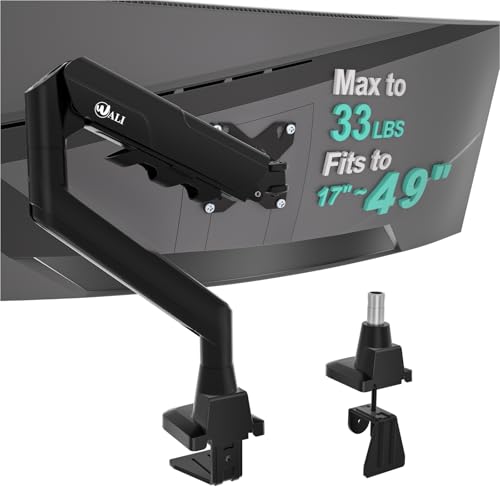
The WALI Ultrawide Single Monitor Arm is an excellent choice for remote workers using larger screens, accommodating displays ranging from 17 to 49 inches (43.2 to 124.5 cm) in both flat and curved designs. With a maximum load capacity of 33 lbs (15 kg), it supports standard mounting patterns of 75×75 mm and 100×100 mm, making it versatile for various monitor types. This monitor arm significantly enhances your home office setup by elevating your screen, thereby freeing valuable desk space for essentials like keyboards, notebooks, and other productivity tools.
Equipped with built-in cable management, it helps maintain a clean and organized workspace. Its ergonomic design allows for full motion adjustments, including swivel, tilt, and rotation, enabling you to find the healthiest viewing angle, which is crucial for long hours of remote work. Tested for durability, this monitor arm provides reliable performance and stability, ensuring that your workspace remains efficient over time.
Best For: Remote workers with larger screens (17-49 inches or 43.2-124.5 cm) looking to create an ergonomic and organized home office environment.
Pros:
- Elevates the monitor, improving desk organization and freeing up space for other work essentials.
- Full motion adjustments provide customizable viewing angles, enhancing comfort during extended work sessions.
- Sturdy and stable design ensures long-lasting performance through rigorous testing.
Cons:
- Installation may require tools and could be complex for some users.
- Limited to certain desk thicknesses for mounting options (1 cm to 5 cm or 0.39″–1.96″).
- Weight capacity is capped at 33 lbs (15 kg), which may not support heavier monitors.
This monitor arm is an ideal investment for anyone looking to optimize their home office setup while working remotely, contributing to both productivity and comfort.
Hexcal Heavy Duty Monitor Arm for Ultrawide Screens

Hexcal Heavy Duty Monitor Arm for Ultrawide Screens
The Hexcal Heavy Duty Monitor Arm is an excellent solution for remote workers seeking robust support for ultrawide screens. Designed to accommodate monitors up to 57 inches (145 cm) and weighing up to 59.4 lbs (27 kg), this monitor arm features VESA compatibility ranging from 75×75 mm to 200×200 mm. Its innovative space-saving design reclaims over 85% of desk space, ensuring your home office remains organized and clutter-free. Additionally, integrated cable management keeps wires tidy, enhancing your workspace’s aesthetic.
Equipped with a gas spring-assist arm, this monitor arm allows for effortless height adjustments. Its superior articulation enables a tilt range of +60° to -20° and a swivel range of ±90°, providing optimal viewing angles for your work. The dual mounting options—a heavy-duty C-clamp and an optional grommet mount—offer versatile installation possibilities, making it a practical choice for any ergonomic workspace.
Best For: Remote workers looking for a heavy-duty monitor arm that supports large ultrawide screens to create an ergonomic home office setup.
Pros:
- Space-saving design that reclaims over 85% of desk space, ideal for small home offices.
- Superior articulation with smooth height adjustments, tilt, and swivel options for optimal viewing angles.
- Dual mounting options for versatile installation on various desk types.
Cons:
- Limited to VESA compatibility, which may not fit all monitor brands.
- Heavy-duty design might be overkill for smaller or lighter monitors.
- Installation could be complex for users unfamiliar with mounting hardware.
This monitor arm is a valuable addition to any home office, enhancing your productivity and comfort while working remotely.
WALI Heavy Duty Monitor Arm for 13-49 inch 1000R Curved Screen, up to 44lbs

WALI Heavy Duty Monitor Arm for 13-49 Inch 1000R Curved Screens
The WALI Heavy Duty Monitor Arm is an excellent solution for remote workers seeking to optimize their home office setups. Designed to support displays from 13 to 49 inches (approximately 33 to 124 cm), including flat and 1000R curved monitors weighing up to 44 lbs (20 kg), this arm accommodates a wide range of screen sizes. It features standard VESA mounting patterns of 75x75mm and 100x100mm, ensuring a straightforward installation process.
This versatile monitor arm enhances desk organization by elevating your screen, freeing up valuable workspace for other essentials such as notebooks, tablets, or coffee mugs. The built-in cable management system helps keep your wires tidy and out of sight, promoting a clean and efficient work environment.
Equipped with full-motion capabilities, the arm allows for extensive adjustments, enabling you to find the most ergonomic position that reduces strain and promotes comfort during long work hours. Constructed for durability, it has successfully passed over 20,000 cycles of use, guaranteeing reliable performance and stability across various desk types.
Best For: Remote workers looking for a sturdy and adaptable monitor arm that accommodates larger screens while enhancing their workspace’s organization and ergonomics.
Pros:
- Supports a wide range of monitor sizes (13-49 inches or 33-124 cm), including 1000R curved screens.
- Full motion features facilitate extensive adjustments, promoting better ergonomics and reducing strain.
- Built-in cable management keeps your home office tidy and organized.
Cons:
- Requires sufficient desk thickness for C-clamp or grommet installation, which may limit compatibility with some desks.
- Installation may be complex for those unfamiliar with mounting hardware.
- The weight capacity of 44 lbs (20 kg) may not support heavier monitors or additional accessories.
This monitor arm is an ideal choice for anyone looking to improve their home office experience, providing both functionality and style.
Factors to Consider When Choosing Heavy Duty Monitor Arms
When selecting heavy-duty monitor arms for your home office, there are several key factors to consider to enhance your remote work experience. First and foremost, ensure compatibility with your monitor’s size and weight, as well as the available mounting options, to guarantee stability. Look for arms that can support monitors weighing up to 15 kg (33 lbs) or more, as this will accommodate a range of devices.
Adjustability is another crucial aspect; choose monitor arms that allow for height, tilt, and swivel adjustments. This can help you create an ergonomic workspace, reducing strain during long hours of work. Also, consider integrated cable management features, which can keep your setup tidy and organized, ultimately boosting productivity.
Key Compatibility Features
Key Compatibility Features for Heavy-Duty Monitor Arms
When enhancing your home office setup, selecting the right heavy-duty monitor arm is crucial for both comfort and productivity. Here are several key compatibility features to consider:
- Monitor Size: Ensure the arm can accommodate your monitor’s size, which typically ranges from 13 inches (33 cm) to 49 inches (124 cm). This range allows for various display types, whether you’re using a compact screen or a larger, immersive monitor.
- Weight Capacity: The arm must support your monitor’s weight, which can vary significantly from 4.4 lbs (2 kg) to 59.4 lbs (27 kg). Check the weight specifications to ensure a secure setup.
- VESA Compatibility: Most monitors adhere to VESA standards, typically 75×75 mm or 100×100 mm. Confirm that the monitor arm is VESA compatible to ensure a secure and stable mounting experience.
- Mounting Options: Depending on your desk setup, you may choose between C-clamp or grommet mounts. Make sure the arm is compatible with your desk thickness, which usually ranges from 0.39 inches (1 cm) to 3.54 inches (9 cm).
- Adjustability Features: To optimize ergonomics and viewing angles, look for arms with adjustable features like tilt, swivel, and height adjustments. This flexibility can help reduce strain during long working hours.
Weight Capacity Considerations
Weight Capacity Considerations for Home Office Monitor Arms
When setting up your home office, weight capacity is a vital factor to consider for heavy-duty monitor arms. This aspect directly affects both stability and safety, ensuring your work environment is efficient and risk-free. Choosing a monitor arm that can support more weight than your monitors is essential to avoid instability and potential damage.
Typically, monitor arms specify weight limits in pounds (lbs), so for optimal safety, aim for an arm that supports at least 20% more than the total weight of your monitors. For instance, if your combined monitor weight is 20 lbs (approximately 9 kg), select an arm that can handle at least 24 lbs (around 10.9 kg).
If you’re using a dual monitor setup, each arm should have a higher capacity due to the combined load. Be sure to check the specifications, as arms designed for heavy monitors may not always offer adequate stability during movement.
Additionally, verifying VESA compatibility is crucial to ensure proper mounting and to avoid exceeding weight limits. This compatibility is important for seamless integration with your monitors, whether you’re in the U.S., Canada, the UK, Europe, or Australia.
Mounting Options Available
Enhancing Your Home Office Setup: The Impact of Mounting Options for Heavy-Duty Monitor Arms****
When setting up your home office, the choice of mounting options for heavy-duty monitor arms can significantly enhance functionality and efficiency. Opting between C-clamp and grommet mounts affects both installation flexibility and stability, crucial for remote workers looking to optimize their workspace.
C-Clamp Mounts:
These mounts are perfect for desks with thicknesses ranging from approximately 0.39 inches (1 cm) to 3.15 inches (8 cm). They offer a straightforward setup that doesn’t require drilling, making them an ideal choice for those who want to avoid permanent modifications to their desk. This ease of installation allows you to quickly adjust your monitor height and position, which is essential for maintaining ergonomic posture during long work hours.
Grommet Mounts:
On the other hand, grommet mounts require a pre-drilled hole in your desk and accommodate thicknesses from 0.39 inches (1 cm) to 2 inches (5 cm). This option not only provides a polished look but also offers a secure attachment that enhances stability, crucial for larger monitors. Grommet mounts are especially beneficial if your desk setup is more permanent and you desire a sleek appearance.
Dual Mounting Options:
Some heavy-duty monitor arms even feature dual mounting options, allowing for greater versatility in your home office setup. This flexibility can be particularly useful for remote workers who may need to adjust their monitors based on different tasks throughout the day.
Choosing the right mounting option is essential for optimizing desk space and ensuring that your monitor arm can adequately support the weight and size of your monitor. A well-mounted monitor can lead to a more efficient workspace, allowing you to focus on your tasks without the distraction of an unstable setup.
Adjustability and Ergonomics
Adjustability and Ergonomics in Home Office Setup
Adjustability is crucial for maximizing the benefits of heavy-duty monitor arms, especially for those working remotely from a home office. Properly positioning monitors at eye level is vital for reducing neck and back strain, fostering a healthier workspace posture. Many heavy-duty monitor arms offer tilt adjustments of +70°/-50°, allowing users to customize angles based on their seating position and lighting conditions.
Swivel capabilities of ±90° and full 360° rotation provide enhanced flexibility, making it easier to collaborate with others or manage multi-screen setups. Height adjustments typically range from 15 to 22 inches (38 to 56 cm), ensuring users can find their ideal viewing height for optimal comfort.
Ergonomic features, such as smooth motion adjustments and lockable positions, ensure monitor stability while preventing accidental shifts during use. This attention to detail significantly enhances the overall ergonomic experience, making it easier to focus on work and maintain productivity in your home office environment.
Investing in a quality monitor arm can transform your workspace, making it not only more functional but also more comfortable for your daily tasks.
Cable Management Solutions
Cable Management Solutions for Your Home Office****
Effective cable management is crucial for anyone working remotely from a home office, especially when it comes to selecting heavy-duty monitor arms. A well-organized workspace can significantly enhance your productivity and comfort. Many monitor arms come with built-in guides or channels that keep cords tidy and out of sight, contributing to a clean and professional appearance.
Integrated cable covers can reclaim valuable desk space, creating a streamlined look while improving overall organization. Additionally, these arms often feature designs that allow for easy access to cables, making adjustments or replacements simple without the need to dismantle your setup. This not only boosts aesthetics but also minimizes the risk of tangling and damage, ultimately extending the lifespan of your cables.
Consider adjustable cable management options that enable you to customize cable routing based on your specific desk configuration and working habits. Whether you’re using a standing desk or an ergonomic chair, effective cable management will help you create a more efficient and enjoyable home office environment.
