
Govee Smart Light Bar, RGBICWW TV Lights for Living Room, Gaming, Black

The Govee Smart Light Bar is an excellent addition for anyone working remotely who wants to enhance their home office environment. With RGBICWW technology, it provides tunable cool-to-warm white light and vibrant RGBIC colors, fostering an inviting atmosphere that can help boost productivity. The light bar features over 60 dynamic scene modes, allowing users to easily customize their lighting through the Govee Home App. It also supports voice control with Alexa and Google Home, enabling effortless adjustments without interrupting your workflow. Additionally, its music sync capability and AI lighting personalization make it a versatile choice for those who prefer an engaging working space. Flexible installation options mean it can be placed in various setups, making it a perfect fit for any home office.
Best For: Remote workers and home office enthusiasts looking to enhance their workspace with customizable and immersive lighting.
Pros:
- Versatile Lighting Options: Offers tunable cool-to-warm white and vibrant RGBIC colors for a personalized ambiance conducive to productivity.
- Smart Features: Compatible with Alexa and Google Home for easy voice control and remote customization via the Govee Home App.
- Flexible Installation: Can be positioned in multiple ways, including flat or mounted, accommodating various home office setups.
Cons:
- Limited Size Compatibility: Best suited for monitors up to 45 inches (approximately 114 cm), which may not fit larger displays.
- Dependent on App: Full functionality relies on the Govee Home App, which may deter users who prefer standalone devices.
- Sound Sensitivity: Music sync feature may pick up unwanted ambient sounds, affecting lighting synchronization.
YEELIGHT Monitor Light Bar with Touch Control

YEELIGHT Monitor Light Bar with Touch Control: Enhance Your Home Office Lighting
Designed for remote workers, the YEELIGHT Monitor Light Bar with Touch Control is an essential addition to any home office setup. This innovative light bar not only elevates your workspace illumination but also filters harmful blue light and features flicker-free illumination, significantly reducing eye strain during long hours of work or gaming. With an ultra-high Color Rendering Index (Ra95) and 78 LED beads, it ensures true color fidelity, making it perfect for tasks that require accurate color representation.
Users can easily customize their lighting experience thanks to stepless dimming and adjustable color temperatures ranging from 2700K (warm white) to 6500K (cool white), catering to various activities such as video calls, programming, or creative projects. Its sleek, full-metal design saves valuable desk space and avoids obstructing your webcam, while the USB-powered setup minimizes clutter, ensuring a tidy work environment.
Best For: Remote workers, professionals, and content creators seeking efficient and customizable lighting solutions for an enhanced home office experience.
Pros:
- Flicker-free illumination reduces eye strain, ideal for extended use.
- Fully customizable lighting with adjustable brightness and color temperature to suit different tasks and moods.
- Space-saving design keeps your workspace organized and free from clutter.
Cons:
- USB-powered may limit placement options if a nearby outlet is not available.
- Initial setup might require adjustments to achieve the desired lighting conditions.
- Full-metal body can make it heavier than some plastic alternatives, potentially affecting monitor stability.
Whether you’re in the US, Canada, the UK, Europe, or Australia, the YEELIGHT Monitor Light Bar is designed to enhance your remote working experience and help you create the ideal home office environment.
16.14″ Monitor Light Bar,250LM USB LED Desk Lamp,Home Office Gaming

16.14″ Monitor Light Bar: The Ultimate Lighting Solution for Your Home Office
Ideal for remote workers and home office enthusiasts, the 16.14″ (approximately 41 cm) Monitor Light Bar enhances visibility without cluttering your workspace. Its innovative counterweight design ensures stable placement on monitors, accommodating various thicknesses from 0.12” (0.3 cm) to 2.2” (5.6 cm). With an asymmetric optical design and anti-blue light technology, this light bar minimizes glare and reduces eye strain, making it perfect for long hours of work or gaming.
Users can easily adjust brightness and switch between three color temperatures via touch buttons, allowing for a personalized lighting experience tailored to different tasks. The built-in memory function recalls your last used settings, adding convenience to your workflow. Durable and long-lasting, this light bar promises quality illumination, while responsive customer support ensures user satisfaction. It’s an excellent addition to any workspace, enhancing productivity and comfort.
Best For: Remote workers and home office users seeking a space-saving lighting solution that improves visibility and minimizes eye strain.
Pros:
- Space-Saving Design: The innovative counterweight allows for stable placement on monitors, freeing up valuable desk space.
- Adjustable Lighting: Choose from three color temperatures and brightness levels for customizable illumination suited to your tasks.
- Memory Function: Automatically recalls your last used settings, enhancing convenience during work or leisure.
Cons:
- Limited Compatibility: Fits monitors with a thickness between 0.12” (0.3 cm) and 2.2” (5.6 cm), which may not accommodate all setups.
- USB Powered: Requires a USB power source, which may limit placement options depending on available ports.
- Touch Sensitivity: Some users may find touch buttons less reliable than traditional switches, especially in low-light conditions.
Elevate your home office experience with the 16.14″ Monitor Light Bar, designed to enhance productivity and make remote working more comfortable.
Quntis Monitor Lamp with Auto-Dimming and Touch Control

Quntis Monitor Lamp: Optimal Lighting for Your Home Office
The Quntis Monitor Lamp is an excellent choice for remote workers seeking eye-friendly lighting solutions in their home office. This lamp features a flicker-free design that effectively reduces harmful blue light, certified to IEC standards, ensuring a comfortable viewing experience and minimizing eye strain during long hours of work. Its innovative asymmetrical optical design reduces glare on screens while providing efficient illumination for your desk area.
With auto-dimming technology, the lamp automatically adjusts brightness based on ambient light conditions, helping to prevent visual fatigue. Users can also manually customize brightness and color temperature, enhancing comfort for various tasks, whether you’re working on reports, video conferencing, or creative projects. With a high Color Rendering Index of Ra98, it produces vibrant colors, making it a perfect addition for students, designers, and office workers alike.
Best For: Remote workers, students, and designers looking for effective, eye-friendly lighting solutions in their home office setups.
Pros:
- Flicker-free design significantly reduces eye strain and discomfort during prolonged use.
- Auto-dimming technology adapts to surrounding light, enhancing visual comfort and productivity.
- High Color Rendering Index (Ra98) ensures vibrant and accurate color representation, ideal for creative tasks.
Cons:
- Limited portability due to its clip-on design, which may not fit all desk setups.
- Initial investment may be higher compared to standard desk lamps, but the benefits justify the cost.
- Requires a power source, which may restrict placement options on some desks.
Upgrade your home office lighting with the Quntis Monitor Lamp for a more productive and comfortable working environment.
Samphon Monitor Light Bar with Dimmable LED
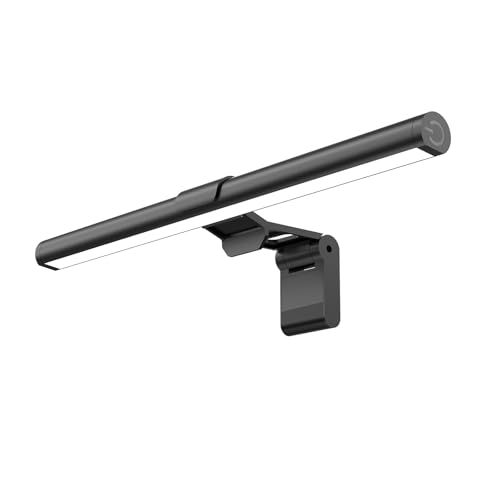
The Samphon Monitor Light Bar is an essential addition for anyone working remotely from their home office. Its user-friendly dimmable LED feature makes it ideal for professionals and gamers alike. Measuring 11.8 inches (30 cm), this sleek black light bar provides up to 800 lux, illuminating an area of 30×20 cm (approximately 11.8×7.9 inches) with bright, uniform lighting that effectively eliminates dark spots and minimizes eye strain. With stepless dimming and three adjustable color temperature options (3000K, 4000K, 6500K), it can be tailored to suit various tasks, whether you’re focusing on work or unwinding during a gaming session.
Powered via USB, it includes a mechanical switch for straightforward operation. The patented counterweight clip ensures compatibility with most screens, allowing you to maintain a clutter-free workspace without sacrificing valuable desk space.
Best For: Remote workers, gamers, and anyone looking to enhance their home office lighting for improved focus and comfort.
Pros:
- Provides bright, uniform lighting with up to 800 lux, enhancing visibility for all work-related tasks.
- Features stepless dimming and multiple color temperature options for a customized lighting experience.
- Space-saving design fits a variety of screen types, helping keep your home office organized and efficient.
Cons:
- USB powered, which may limit placement options if electrical outlets are not easily accessible.
- The mechanical switch may lack the convenience of remote control options.
- Some users might find it challenging to adjust brightness and color temperature using a single switch.
This versatile light bar is a smart investment for anyone serious about optimizing their home office setup for productivity and comfort.
16.6″ RGB Monitor Light Bar, LED Lighting for Flat Computer Monitors

16.6″ (42.2 cm) RGB Monitor Light Bar: Illuminate Your Home Office
The 16.6″ (42.2 cm) RGB Monitor Light Bar is an excellent addition for remote workers looking to enhance their home office setup with both functional task lighting and vibrant ambient effects. Crafted by BZHKU, this light bar features a dual-light design that seamlessly blends practicality with aesthetic appeal.
With adjustable color temperatures and a diverse array of RGB settings, including 9 static modes and 15 dynamic effects, it caters to various work environments—from focused office tasks to immersive gaming. Its innovative asymmetric optical structure minimizes glare, ensuring eye comfort during extended work sessions, which is essential for maintaining productivity.
The clip-on design allows for easy, scratch-free installation on flat monitors, making setup a breeze. Plus, its USB power compatibility simplifies the process, ensuring you can connect it to your existing devices without hassle.
This model is perfect for anyone aiming to elevate both functionality and style in their home office or gaming space.
Best For: Remote workers and gamers looking to enhance their home office setup with practical lighting and customizable RGB effects.
Pros:
- Dual-light design provides both task and ambient lighting for versatile use in a home office.
- Adjustable color temperatures and multiple RGB modes cater to different preferences and work moods.
- Simple installation with a clip-on design ensures scratch-free application on flat monitors.
Cons:
- Limited compatibility may not suit curved monitors or larger setups, potentially restricting usability.
- USB power dependency requires available ports, which could be a challenge for some users with limited connectivity.
- RGB effects may be distracting for those who prefer a more subdued workspace conducive to concentration.
Govee Smart Light Bar, RGBICWW TV Lights for Living Room, Gaming, Silver

Govee Smart Light Bar: Elevate Your Home Office Setup
Ideal for remote workers and home office enthusiasts, the Govee Smart Light Bar enhances any workspace with vibrant RGBIC colors and customizable lighting. Designed for monitors under 45 inches (approximately 114 cm), this sleek silver light bar utilizes RGBICWW technology, providing tunable cool-to-warm whites alongside vivid colors. With smart features that enable voice control via Alexa and Google Home, as well as app customization through the Govee Home App, it seamlessly integrates into your home office tech.
The music sync capabilities and AI generative lighting adapt to ambient sounds, creating an immersive atmosphere that can help boost productivity. Its versatile design allows for multiple placement options, ensuring it complements any workspace, whether you’re focused on a project or enjoying a break.
Best For: Remote workers and home office enthusiasts looking to enhance their workspace with immersive lighting.
Pros:
- Vivid RGBIC colors and customizable lighting improve focus and create an engaging work environment.
- Smart features include voice control and app customization for added convenience.
- Versatile design fits seamlessly into various home office setups.
Cons:
- Limited to monitors under 45 inches (approximately 114 cm), which may not accommodate larger displays.
- Cord length of 106 inches (approximately 270 cm) might restrict placement options in larger spaces.
- AI generative lighting may require initial setup time for personalized effects.
Upgrade your home office with the Govee Smart Light Bar for a productive and inspiring work environment.
Factors to Consider When Choosing Monitor Light Bars
When selecting monitor light bars for your home office setup, several key factors should be considered to enhance your remote working experience. First and foremost, prioritize lighting quality and type to ensure optimal visibility and comfort during long hours of work. Look for models with features designed for eye protection, as this can help reduce strain and fatigue—a common issue for those who spend extended periods in front of screens.
Additionally, consider options for dimming and color control, which can be crucial for creating the ideal working atmosphere, whether you prefer a bright, focused light or a warmer glow for late-night tasks. The design and ease of installation also play significant roles in user satisfaction; you want a light bar that not only complements your workspace aesthetically but is also hassle-free to set up.
Factors to Consider When Choosing Monitor Light Bars
Factors to Consider When Choosing Monitor Light Bars for Your Home Office
Selecting the right monitor light bar can significantly enhance your remote work experience by improving visibility and reducing eye strain. When choosing a light bar for your home office setup, consider the following factors:
- Lighting Quality: Ensure the light bar provides flicker-free illumination and boasts a high Color Rendering Index (CRI) for accurate color representation. This is crucial for tasks that require precise color differentiation, especially if you’re involved in design or video editing.
- Adjustable Settings: Look for customizable brightness levels and color temperature options. This flexibility allows you to tailor your lighting to suit various tasks, whether you’re reading documents or participating in video calls.
- Space Efficiency: Opt for clip-on designs that save valuable desk space while accommodating different monitor thicknesses. This is especially important in smaller home offices where maximizing space is key.
- Eye Protection Features: Features like blue light filtering and glare reduction are essential for comfort during prolonged use. These elements help mitigate the effects of long hours in front of a screen, promoting better eye health.
- Smart Features: Consider light bars with app control or voice compatibility for convenient customization and automation of your lighting settings. This can enhance your overall productivity by allowing you to adjust your environment seamlessly.
Lighting Quality and Type
Lighting Quality and Type for Your Home Office Setup
When working remotely, the quality and type of lighting in your home office can significantly impact your comfort and productivity. A good monitor light bar should provide flicker-free illumination and have an RG0 rating to effectively filter harmful blue light, which is essential for reducing eye strain during long hours of work.
Look for adjustable color temperatures ranging from 2700K to 6500K (about 64°F to 11,000°F) to suit different tasks and enhance your overall work experience. A high Color Rendering Index (CRI) above 90 ensures true color fidelity, improving visual clarity and minimizing shadows and glare, which is particularly beneficial when reviewing documents or creating presentations.
Moreover, stepless dimming capabilities allow you to fine-tune brightness levels to match your preferences, ensuring optimal lighting for any activity. Features designed to reduce glare, such as asymmetric optical designs, illuminate your desk area without reflecting off your monitor screen, helping you maintain focus and productivity.
Investing in high-quality lighting solutions will create a more conducive environment for your home office, ultimately enhancing your remote working experience.
Eye Protection Features
Eye Protection Features for Your Home Office Setup
When setting up an efficient and comfortable home office, a range of eye protection features in monitor light bars is crucial for anyone working remotely. These features can significantly enhance visual comfort during long hours of use.
Monitor light bars with a low blue light hazard rating help reduce eye strain and fatigue, promoting healthier visual habits essential for productivity. Flicker-free illumination ensures stable light, minimizing distractions and discomfort whether you’re working on reports or gaming during your downtime.
High Color Rendering Index (CRI) values, such as Ra95 or Ra98, provide accurate color representation, which is vital for tasks requiring attention to detail. This enhances visual clarity and reduces shadows, making your workspace more effective.
Asymmetric optical designs focus light on your desk while preventing screen glare, allowing you to maintain better focus and comfort. Additionally, features like auto-dimming based on ambient light levels help adjust brightness automatically, further reducing visual fatigue as lighting conditions change throughout the day.
Dimming and Color Control
When enhancing your home office setup, controlling brightness and color temperature in monitor light bars is essential for optimizing your workspace. Dimming features, often with stepless controls, allow you to adjust brightness levels based on your activities—whether you’re focused on work or winding down for relaxation. Color temperature adjustments typically range from a warm 2,700K (about 2,427°F) to a cool 6,500K (approximately 6,727°F), catering to different lighting needs and personal preferences.
Many models also come equipped with memory functions that retain your last used settings, ensuring a consistent lighting experience. Advanced options may provide multiple fixed color temperature modes tailored for specific tasks like reading or gaming. Additionally, a high Color Rendering Index (CRI) above 90 guarantees accurate color fidelity, which is crucial for detailed visual tasks.
Design and Installation Ease
Design and Installation Ease for Monitor Light Bars
When selecting a monitor light bar, it’s essential to consider both design and installation ease, as these elements significantly affect your home office setup. Many models offer a convenient clip-on design, making installation quick and tool-free across various screen thicknesses. This feature enhances the overall convenience for remote workers looking to optimize their workspace.
Innovative space-saving designs, such as counterweight clips, allow the light bar to sit directly atop your monitor, keeping your desk clutter-free—ideal for those who prioritize an organized home office. Adjustable installation options enable you to lay the light bar flat, mount it vertically, or position it behind the monitor for optimal lighting, catering to diverse preferences and setups.
USB-powered operation simplifies the setup process, allowing easy connections to computers or power banks while minimizing cable clutter. Additionally, light bars with advanced optical designs reduce screen glare, ensuring effective illumination and increased comfort for users during long working hours.
Whether you’re in the U.S., Canada, the UK, Europe, or Australia, enhancing your home office with a properly designed monitor light bar can greatly improve your productivity and overall working experience.
Space-Saving Solutions
Selecting the Right Monitor Light Bar for Your Home Office
When it comes to enhancing your home office setup, selecting the right monitor light bar is essential for creating an efficient and organized workspace. Many models feature innovative clip-on designs that allow for easy installation on various screen types without taking up valuable desk space. These light bars are perfect for remote workers looking to optimize their environment.
Some models come equipped with counterweight designs, enabling stable placement atop monitors while keeping your desk area clutter-free. A retractable clip compatibility accommodates monitors with thicknesses ranging from 0.76 cm to 5.58 cm (0.3 to 2.2 inches), ensuring versatility for different setups. By eliminating traditional lamp bases, these light bars help reduce clutter and tangles from wires, promoting a cleaner workspace ideal for productivity.
Additionally, many light bars are designed to minimize screen glare and shadows, ensuring optimal lighting that enhances visual comfort during long working hours. With these features, monitor light bars stand out as a practical choice for anyone looking to improve their home office environment. Whether you’re using a standing desk, ergonomic chair, or simply need better lighting for your laptop, investing in a quality monitor light bar can significantly elevate your remote work experience.
Power Source Compatibility
Power Source Compatibility for Monitor Light Bars in Your Home Office
Power source compatibility is crucial for maximizing the effectiveness of monitor light bars in your home office setup. Most monitor light bars are powered via USB, allowing for flexible connectivity to computers, adapters, or power banks. This design helps reduce clutter from traditional lamp bases, which is especially beneficial in smaller workspaces.
The length of the power cable varies by model, with some offering up to 1.5 meters (approximately 4.9 feet), accommodating different desk layouts and monitor placements. Many light bars feature a plug-and-play design, making installation straightforward and tool-free—perfect for busy remote workers looking to enhance their workspace quickly.
Moreover, certain models can draw power directly from the monitor’s USB port, minimizing the need for additional outlets and keeping your setup tidy. However, it’s essential to verify the light bar’s power requirements to ensure compatibility with your existing power sources and to avoid exceeding USB port output limits.
