
HUANUO Triple Monitor Mount for 17-32 inch Screens

The HUANUO Triple Monitor Mount is a fantastic addition for remote workers and professionals looking to enhance their home office setup with three monitors ranging from 17 to 32 inches (43 to 81 cm). This mount is compatible with VESA mounting holes of 75×75 mm or 100×100 mm, supporting weights between 4.4 lbs (2 kg) and 17.6 lbs (8 kg). By elevating your monitors off the desk, this mount promotes a spacious and organized workspace, essential for productive remote work.
With its adjustability, you can easily swivel, tilt, and rotate your monitors, allowing for seamless transitions between landscape and portrait orientations. Whether you’re working on projects, attending virtual meetings, or gaming during breaks, this mount caters to your needs. Installation is straightforward with options for C-clamp or grommet mounting, ensuring a secure fit for various desk thicknesses, which enhances both comfort and productivity.
Best For: Remote workers and professionals seeking to optimize their home office with multiple monitors for enhanced productivity and comfort.
Pros:
- Space-saving design elevates monitors off the desk, creating a clutter-free workstation ideal for home offices.
- Highly adjustable features provide optimal viewing angles and flexible display orientations, accommodating diverse work tasks.
- Secure installation options with both C-clamp and grommet mount methods to fit various desk thicknesses, enhancing stability.
Cons:
- Limited weight capacity may not support heavier monitors beyond 17.6 lbs (8 kg).
- Installation complexity could be challenging for users unfamiliar with mounting setups.
- VESA compatibility requirements may restrict use with non-VESA monitors.
This mount is an excellent way to transform your home office into a more efficient and comfortable workspace, allowing you to work effectively and productively from the comfort of your home.
MOUNT PRO Triple Monitor Desk Mount (Max 32″)

MOUNT PRO Triple Monitor Desk Mount (Max 32″)
Engineered for versatility, the MOUNT PRO Triple Monitor Desk Mount is designed to accommodate three displays ranging from 13” to 32” (33 cm to 81 cm). This mount supports up to 19.8 lbs (9 kg) per arm, providing stable support for both flat and curved screens, though it is not compatible with 1000R curved displays. With full motion capability, users can effortlessly tilt, swivel, and rotate monitors to achieve optimal viewing angles. Height adjustments range from 28 to 36.3 inches (71.1 cm to 92.2 cm), and the mount can extend up to 18.1 inches (46 cm). Installation options include a C-Clamp or grommet base, and the integrated cable management system ensures a tidy workspace.
Best For: Remote workers looking to enhance productivity with multiple screens while keeping their home office organized.
Pros:
- Full motion capability allows for versatile positioning with tilt, swivel, and rotation features, perfect for multitasking.
- Supports a wide range of monitor sizes (13” to 32” / 33 cm to 81 cm) and weights (up to 19.8 lbs / 9 kg) for various setups.
- Integrated cable management system keeps cords organized, minimizing workspace clutter.
Cons:
- Not compatible with 1000R curved screens, which may limit options for users who prefer that display type.
- Installation may require tools and some assembly time, which could be a drawback for those seeking quick setups.
- Limited height adjustment range may not meet all users’ ergonomic needs, particularly for taller workstations.
Enhance your home office setup with the MOUNT PRO Triple Monitor Desk Mount, designed to support your remote working needs effectively and efficiently.
MOUNTUP Triple Monitor Stand Mount for 27-inch Screens
Product not found or API error.
Perfect for remote workers looking to enhance their home office setup, the MOUNTUP Triple Monitor Stand Mount provides support for three 27-inch (68.5 cm) screens, significantly boosting productivity and workspace efficiency. This adaptable mount accommodates a variety of LCD screens, with an impressive weight capacity of 4.4 to 19.8 lbs (2 to 9 kg) per arm, and is compatible with VESA mounting patterns of 75×75 mm and 100×100 mm.
Installation is a breeze with options for both C-clamp and grommet mounts, catering to different desk configurations. Its articulating design allows for tilt, swivel, and rotation adjustments, ensuring you can fine-tune the height for optimal viewing comfort. Made from durable steel, the mount also includes integrated cable management, helping to keep your workspace tidy and organized. Assembly is quick and straightforward, taking about 20 minutes.
Best For: Remote workers and professionals aiming to enhance their productivity with a triple monitor setup.
Pros:
- Versatile Compatibility: Fits a wide range of flat or curved LCD screens up to 27 inches (68.5 cm).
- Adjustable Features: Extensive tilt, swivel, and rotation capabilities for optimal viewing angles.
- Space-Saving Design: Elevates monitors off the desk, freeing up valuable workspace, plus integrated cable management keeps everything organized.
Cons:
- Weight Limitations: Each arm has a maximum weight capacity of 19.8 lbs (9 kg), which may not support heavier monitors.
- Desk Thickness Restrictions: Installation methods have specific thickness requirements that may limit compatibility with certain desks.
- Assembly Time: While straightforward, assembly takes about 20 minutes, which may be a consideration for some users.
This mount is an excellent investment for anyone working remotely who wants to create an efficient and organized home office environment.
Triple Monitor Mount with Adjustable Gas Spring Arm
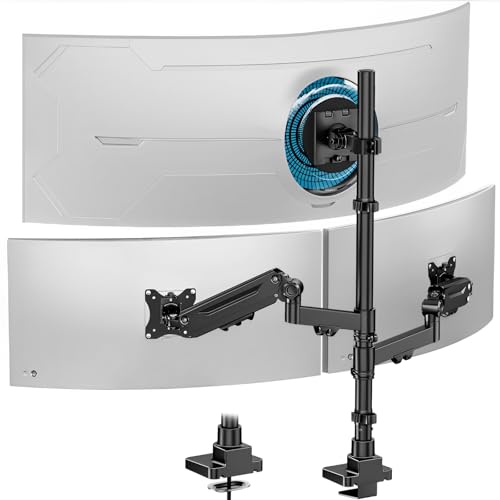
For remote professionals looking to enhance their home office setup, the Triple Monitor Mount with Adjustable Gas Spring Arm provides outstanding versatility and ergonomic support. This mount accommodates up to 49-inch (124.5 cm) ultrawide screens or two 35-inch (88.9 cm) monitors, compatible with various weights and VESA patterns, making it ideal for diverse setups.
The adjustable arms allow for tilting, swiveling, and rotating, ensuring optimal positioning for productivity. The height-adjustable center screen promotes ergonomic comfort, helping to reduce strain during long work hours. Additionally, the integrated cable management system keeps your workspace organized and clutter-free.
Installation is hassle-free with a C-clamp that fits desk thicknesses ranging from 0.4 inches to 2.4 inches (1 cm to 6 cm), and all necessary tools are included for your convenience. Constructed from durable cast aluminum, this mount ensures stability and reliability, complemented by dedicated customer support for any inquiries.
Best For: Remote workers aiming to create an ergonomic and efficient workspace with multiple monitors.
Pros:
- High Compatibility: Supports both ultrawide and standard monitors, accommodating a range of sizes and weights.
- Adjustable Features: Extensive customization options with tilting, swiveling, and rotating capabilities for optimal viewing angles.
- Easy Installation: Quick setup with included tools and a versatile C-clamp mount suitable for various desk thicknesses.
Cons:
- Weight Limitations: May not support monitors exceeding specified weight limits.
- Desk Space Requirement: The C-clamp design necessitates adequate desk edge space, which might not be feasible for all home office configurations.
- Adjustment Learning Curve: Users may need some time to master the gas spring adjustment mechanism for perfect positioning.
This Triple Monitor Mount is an essential addition for anyone looking to optimize their home office environment and boost productivity.
WALI Triple Monitor Mount for 13-32 inch Screens, up to 19.8 lbs per Arm

The WALI Triple Monitor Mount is an ideal solution for remote workers looking to enhance their home office setup. Designed for compatibility with screens ranging from 13 to 32 inches (approximately 33 to 81 cm), this mount is perfect for those in need of versatile display options. With a maximum load capacity of 19.8 lbs (about 9 kg) per arm, it ensures both stability and durability for your monitors.
The dual C-clamp design accommodates desk thicknesses from 0.39″ to 3.54″ (1 to 9 cm), making it suitable for various desk types. Its full motion adjustability allows for optimal positioning, ensuring that your screens are set at the perfect angle for comfort and productivity. Additionally, the built-in cable management system promotes an organized workspace, reducing clutter and distractions.
Designed with ergonomic benefits in mind, this mount elevates your screens to eye level, helping to minimize strain during long hours of work. The WALI Triple Monitor Mount has been rigorously tested for consistent performance, providing reliability for daily use.
Best For: Remote workers seeking an efficient and ergonomic solution for managing multiple screens in their home office.
Pros:
- Versatile Compatibility: Fits most flat or curved screens from 13 to 32 inches (33 to 81 cm).
- Space-Saving Design: Elevates monitors to free up valuable desktop space, enhancing your work area.
- Full Motion Adjustability: Offers an extensive range of motion for optimal viewing angles, improving comfort during work.
Cons:
- Weight Limit: Each arm supports a maximum of 19.8 lbs (9 kg), which may not be suitable for heavier monitors.
- Installation Requirements: Best suited for wooden desks without crossbeams, which may limit placement options for some users.
- Potential Complexity: Initial setup may require more time and effort compared to simpler mounts, which could be a consideration for those seeking quick installation.
This mount is a valuable addition for anyone aiming to improve their home office environment, promoting productivity and comfort while working remotely.
MOUNTUP Triple Monitor Mount for 17-32 Inch Screens

For remote workers seeking to optimize their home office setup, the MOUNTUP Triple Monitor Mount is an ideal solution that supports 17-32 inch screens (43-81 cm). The MU8004 model accommodates both flat and curved displays, featuring VESA compatibility of 75x75mm or 100x100mm. Each arm can hold weights between 4.4 to 19.8 lbs (2-9 kg), ensuring dependable support for your monitors.
Its full motion design allows for height adjustment, swivel, tilt, and rotation, enhancing ergonomic comfort during long working hours. With C-clamp and grommet mounting options, installation is straightforward and can be completed in under 20 minutes, making it perfect for anyone setting up or upgrading their workspace. Built from heavy-gauge steel, this mount promises durability and includes a 3-year warranty, ensuring it stands the test of time in your home office.
Best For: Remote workers aiming to create an efficient and ergonomic multi-monitor setup in their home office.
Pros:
- Full motion design allows for customizable viewing angles and improved ergonomics, crucial for long hours of remote work.
- Space-saving design reduces desktop clutter by over 80% compared to using individual stands, maximizing your workspace.
- Durable construction from heavy-gauge steel ensures long-lasting stability and support, ideal for a busy home office.
Cons:
- Limited weight capacity may not accommodate very heavy monitors, so check your monitor specifications.
- Installation may require tools or assistance for optimal setup, especially if you’re new to home office equipment.
- C-clamp and grommet options may not be compatible with all desk types, so ensure your desk can accommodate the mounting style.
This mount is a smart investment for anyone looking to enhance their productivity and comfort while working remotely.
ErgoFocus Triple Monitor Desk Mount for Computer Screens up to 32″
Product not found or API error.
ErgoFocus Triple Monitor Desk Mount for Computer Screens up to 32″ (81.3 cm)
Designed for remote workers and home office enthusiasts, the ErgoFocus Triple Monitor Desk Mount provides robust support for screens up to 32 inches (81.3 cm). Perfect for multitaskers and gamers, this mount is compatible with both flat and curved monitors, featuring VESA compatibility (75×75 mm and 100×100 mm) and a weight capacity of 19.8 lbs (9 kg) per arm. Its fully adjustable design allows for 360° rotation, 180° swivel, and 90° tilt, ensuring you achieve the ideal viewing angles for enhanced productivity.
Elevating your monitors off the desk not only maximizes workspace but also includes integrated cable management to help reduce clutter in your home office. With versatile mounting options and straightforward assembly, the ErgoFocus mount stands out as an ideal solution for improving your workspace efficiency.
Best For: Remote workers and gamers seeking an efficient and adjustable setup for multiple monitors.
Pros:
- Fully adjustable design allows for optimal viewing angles with 360° rotation, 180° swivel, and 90° tilt.
- Space-saving solution elevates monitors off the desk, featuring integrated cable management to minimize clutter.
- Versatile mounting options accommodate various desk thicknesses, making installation easy.
Cons:
- Weight limit of 19.8 lbs (9 kg) per arm may not support heavier monitors.
- Assembly required, which may be challenging for some users.
- Limited compatibility with certain monitor sizes outside the 13″ to 32″ (33 cm to 81.3 cm) range.
Elevate your home office setup with the ErgoFocus Triple Monitor Desk Mount and experience the benefits of improved organization and productivity.
Factors to Consider When Choosing Triple Monitor Arms
When selecting triple monitor arms for your home office setup, several key factors should be considered to enhance your remote working experience. Firstly, ensure compatibility with your monitor size and weight capacity; this is crucial for a secure and stable fit. Most monitor arms follow VESA mounting standards, so verifying this aspect is essential.
Additionally, look for adjustability features such as height, tilt, and swivel options, as these can significantly improve your ergonomic posture and overall comfort during long work hours. Installation methods should also be user-friendly, allowing for a hassle-free setup, whether you’re in Canada, the UK, Europe, Australia, or the US.
Monitor Size Compatibility
Monitor Size Compatibility for Your Home Office Setup
When selecting the ideal triple monitor arm for your home office, understanding monitor size compatibility is crucial. Most models support monitors ranging from 13 to 32 inches (approximately 33 to 81 cm), so it’s essential to verify that the arm accommodates your specific monitor sizes.
Additionally, checking VESA compatibility is vital; most monitors require mounting patterns of either 75×75 mm or 100×100 mm. This is equivalent to 3×3 inches or 4×4 inches in US measurements.
The arrangement of your monitors is also significant; some arms are designed to support both flat and curved displays, while others may have restrictions regarding curved screen compatibility.
Lastly, ensure the arm can handle the total combined weight of your monitors, which typically ranges from 4.4 to 19.8 lbs (approximately 2 to 9 kg) per monitor, depending on the model. Proper compatibility not only guarantees a stable setup but also enhances your productivity and comfort while working remotely from your home office.
2. Weight Capacity Considerations
Weight Capacity Considerations for Triple Monitor Arms in Your Home Office
When enhancing your home office setup with triple monitor arms, understanding monitor size compatibility is just the beginning. It’s crucial to consider the weight capacity of each arm to ensure they can adequately support your monitors, which typically weigh between 4.4 lbs (2 kg) and 19.8 lbs (9 kg).
Make sure to verify that the total weight of all your monitors does not exceed the mount’s specified limit, which often ranges from 4.4 lbs (2 kg) to 44 lbs (20 kg) for the entire setup. Proper weight distribution is also essential—unevenly distributed monitors can compromise stability and affect your workspace’s functionality.
Additionally, always check the weight specifications and VESA compatibility for each arm. Some mounts may support higher weights for specific monitor sizes, so it’s wise to do your research. If you’re planning future upgrades, consider potential heavier monitors to ensure your setup remains robust and versatile.
3. VESA Mounting Standards
VESA Mounting Standards for Home Office Setup
VESA mounting standards are essential for ensuring that triple monitor arms securely support a variety of monitor sizes and brands, making them particularly relevant for anyone working remotely from a home office. These standards are defined by the distance between the mounting holes on the back of a monitor, typically measured in millimeters (mm), with common sizes being 75x75mm (approximately 3×3 inches) and 100x100mm (approximately 4×4 inches).
These mounting standards guarantee compatibility between monitors and mounting arms, allowing for a secure attachment that can support the monitor’s weight and dimensions. Most triple monitor mounts are designed to accommodate a range of VESA patterns, which is crucial for users with different monitor brands and setups.
Following VESA standards not only helps in achieving a stable and organized workspace but also ensures that weight is distributed evenly across the mount, minimizing the risk of instability or damage. This is particularly important for remote workers who rely on multiple screens to enhance productivity.
Before setting up your home office, it’s vital to verify VESA compatibility to ensure a successful installation of your monitor mounts, enabling you to create the optimal working environment for your needs.
4. Adjustability Features Offered
Adjustability Features Offered
When setting up a home office, compatibility with VESA mounting standards is just the beginning. The adjustability features of triple monitor arms are crucial for optimizing your workspace and enhancing productivity. Full motion capabilities, including tilt from -45° to +90°, swivel up to 180°, and 360° rotation, provide customizable viewing angles that cater to various tasks, making it easier to shift between work and video calls.
Height adjustment features allow you to elevate your monitors by several inches (approximately 15 cm), promoting ergonomic viewing and reducing strain during long hours of work. Additionally, adjustable arms that support both landscape and portrait orientations accommodate different user preferences, ensuring you can work comfortably in the way that suits you best.
Dynamic extension and retraction capabilities enable you to position monitors closer or further away based on your individual needs, providing flexibility for different tasks or collaborative efforts. Lastly, integrated cable management systems keep your workspace organized, enhancing both aesthetics and functionality—essential for creating a productive home office environment.
Whether you’re in the US, Canada, the UK, Europe, or Australia, investing in adjustable monitor arms can transform your home office setup, making it more efficient and tailored to your workstyle.
5. Installation Methods Available
When choosing triple monitor arms for your home office setup, you’ll typically encounter two main installation methods: C-clamp and grommet mount.
C-Clamp Mounts: These are ideal for desks with a thickness ranging from 0.39 to 3.15 inches (1 to 8 cm). They provide a secure attachment without the need for drilling, making them a popular choice for remote workers who want a hassle-free installation. This method usually allows for a quicker setup, which can be particularly appealing for those looking to enhance their workspace efficiency without extensive modifications.
Grommet Mounts: In contrast, Grommet Mounts require a pre-drilled hole in your desk and typically accommodate thicknesses of 0.39 to 2.36 inches (1 to 6 cm). While this option offers a sleeker, more integrated look, it may involve a bit more time and effort to set up.
Most triple monitor arms include the necessary tools and hardware, enabling you to complete the installation in under 20 minutes. This ensures you can create a stable and visually appealing workspace, enhancing your productivity in your home office environment.
6. Space Optimization Solutions
Maximizing workspace efficiency is essential for anyone working remotely from a home office, and choosing the right triple monitor arms can significantly enhance your setup. These arms elevate screens above the desktop, effectively reducing clutter and creating valuable space for essential items like keyboards and notebooks.
Most models accommodate various monitor sizes, typically ranging from 17 to 32 inches (43 to 81 cm), allowing for flexible configurations tailored to your specific workspace needs. Adjustable features such as tilt, swivel, and rotation enable users to position monitors at ideal viewing angles, enhancing comfort and reducing strain during extended use.
By freeing up desk space, triple monitor arms not only contribute to improved ergonomics—promoting better posture—but also lead to increased productivity. The right monitor arm can transform your home office into a more organized and efficient environment, making it easier to focus on your work and maintain a productive workflow.
Whether you’re in the US, Canada, the UK, Europe, or Australia, investing in quality monitor arms can be a game-changer for your remote work experience.
7. Cable Management Options
7. Cable Management Options
Effective cable management is essential for creating an organized and efficient home office, particularly when using triple monitor arms. For remote workers, a clutter-free workspace is crucial for productivity. Integrated systems such as clips and covers can help conceal and organize wiring, significantly reducing visual clutter.
Many models come with built-in channels or raceways, specifically designed to route cables neatly along the arms or behind the mount. This not only enhances the aesthetic appeal of your workstation but also makes it easier to access cables for maintenance or adjustments.
To accommodate various cable thicknesses, it’s important to choose a cable management system that prevents tangling and damage, ensuring long-lasting functionality. A well-organized cable setup contributes to a more focused work environment, allowing remote workers to concentrate on their tasks without unnecessary distractions.
Investing in effective cable management solutions can elevate your home office experience, making it a more productive space for all your work-from-home needs.
8. Durability and Material Quality
When selecting triple monitor arms for your home office, durability and material quality are essential for ensuring a stable and long-lasting setup. Opting for heavy-gauge steel and cast aluminum can provide superior stability and longevity compared to lighter materials. A reliable monitor arm should be rigorously tested, simulating over 20,000 adjustments to guarantee its strength and reliability.
Consider the weight capacity of the monitor arms, typically ranging from 4.4 lbs (2 kg) to 19.8 lbs (9 kg) per arm. This range accommodates various monitor sizes securely, making it easier to find a solution that fits your specific needs. Additionally, integrated cable management systems not only enhance the visual appeal of your workspace but also prevent wear and tear on your cables, further extending their lifespan.
Lastly, look for products that come with a warranty period of 3 years to a lifetime, as this reflects the manufacturer’s confidence in the durability and material quality of the monitor arms. Investing in high-quality monitor arms can significantly improve your home office setup, promoting productivity and comfort in your remote working environment.
